Bring personal devices in without intruding
On private phones (BYOD) we protect only the company area via app management (MAM). On exit we selectively wipe business data, while the employee's photos and private content stay untouched.
Unbox, sign in and work: Autopilot and Intune deliver apps, policies and compliance without an IT appointment. Management and offboarding stay centrally visible.


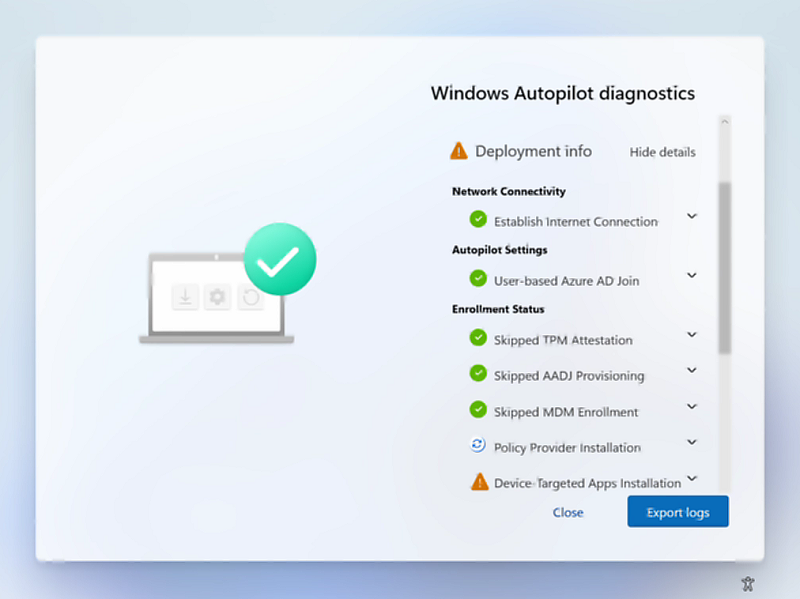 Windows AutopilotFirst-run diagnostics make enrolment, policies and app deployment reviewable.
The flow shows what happens at first start, during daily operation and when a device is returned.
Autopilot assigns the device to the organisation; Intune loads the intended apps, settings and policies.
Windows AutopilotFirst-run diagnostics make enrolment, policies and app deployment reviewable.On private phones (BYOD) we protect only the company area via app management (MAM). On exit we selectively wipe business data, while the employee's photos and private content stay untouched.
If a device goes missing, we lock or wipe it remotely, fully or just the company container. Data is gone before it becomes a problem.
Every new laptop means hours of manual setup, every lost phone is a data risk, and nobody quite knows which device is on which state. In an SME without a large IT team, this lands on a few individuals, or it simply doesn't get done. Updates slip, and old devices leave the building without proper offboarding.
A visible change, not another tool rollout.
Autopilot · Intune · Compliance · Offboarding
The documented foundation for deployment, security, compliance and offboarding.
Corporate and personal devices use separate management models with a clearly documented scope.
Management runs on Microsoft 365 with data residency in Switzerland or the EU, aligned with revDSG and GDPR. We configure storage location and policies so your data protection requirements are demonstrably met.
No. We deliberately favour cloud-native Entra join over hybrid, unless legacy systems genuinely require otherwise. That removes a local server, lowers cost and noticeably simplifies operations.
For most SMEs Microsoft 365 Business Premium is the right basis, it includes Intune (Plan 1) and Defender for Business. We tell you upfront and transparently what you actually need, rather than selling more than necessary.
With BYOD we manage only the company area via app management. On exit we selectively wipe business data, while everything private to the employee stays intact and untouched.
Whether it's migrating to Microsoft 365, zero-trust security or a Copilot rollout — together we'll find the right path.