Passwordless as the goal, not a dream
Windows Hello, FIDO2 keys and passkeys make the password obsolete — more secure and noticeably easier day to day. Fewer password resets, faster sign-in, no reusing weak passwords.
Entra ID, MFA and Conditional Access govern access using identity, device, location and risk. We design traceable policies and test them before rollout.

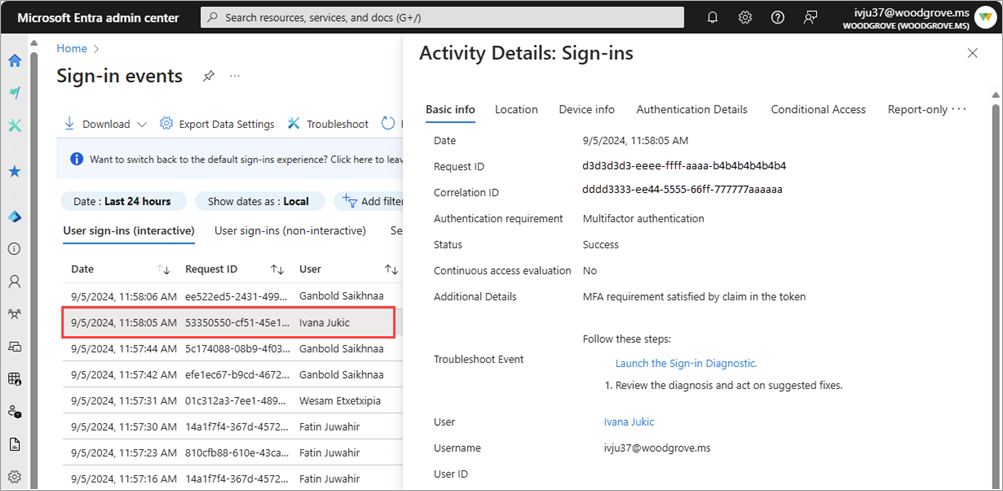 Microsoft Entra IDSign-in events expose status, authentication requirement and additional signals.
Three real product views show where sign-in signals, policy decisions and evidence become visible.
Entra ID evaluates the user, device compliance, location and known risk signals together.
Microsoft Entra IDSign-in events expose status, authentication requirement and additional signals.Windows Hello, FIDO2 keys and passkeys make the password obsolete — more secure and noticeably easier day to day. Fewer password resets, faster sign-in, no reusing weak passwords.
We harden admin roles with PIM, set up access reviews and ensure clean onboarding and offboarding. So if something goes wrong, the damage stays contained — and nothing is left open when someone leaves.
The default settings still allow legacy protocols that bypass MFA entirely, and much of what you pay for sits unused. Only 42 percent of Swiss SMEs feel adequately protected — and those exact gaps are what token theft, consent phishing and CEO fraud exploit. You are paying for protection that was never switched on.
A visible change, not another tool rollout.
Entra ID · MFA · Conditional Access · Emergency access
A documented set of policies, roles, emergency access and a rollout plan.
The effect is reviewed in report-only mode before the policies are introduced in a controlled rollout.
Honestly: not exclusively. Entra identity data follows the EU Data Boundary (EU plus EFTA — Switzerland is included), not a Switzerland-only arrangement. Core Office 365 content, by contrast, can be pinned to the Switzerland Geo. One caveat: SMS, voice and push notifications can be processed outside that boundary — OATH hardware tokens keep the data inside. We draw this line correctly for you.
Usually not. Most of it — Conditional Access, FIDO2, Windows Hello, passkeys, authentication strengths — sits in Entra ID P1, which is included in Microsoft 365 Business Premium. It just needs configuring correctly. Only risk-based protection and Entra ID Protection require P2. We recommend an add-on only when it concretely helps you.
No. We roll out Conditional Access in report-only mode first and see what would happen before anything is blocked. Emergency break-glass accounts stay excluded so you can never be locked out. The transition is gradual and coordinated.
Yes. Many insurers require MFA and Conditional Access and ask about them in their questionnaires. With protection set up correctly and audit logs in place, you meet these requirements demonstrably — which often lowers the premium and makes the policy possible at all.
Theia ITDR & EDR: a human-led SOC (powered by Huntress) stops account takeovers and ransomware before they become damage.
Microsoft 365 backup in the Swiss Fort KnoxDaily, immutable backup for Exchange, SharePoint, OneDrive and Teams (MOUNT10) — your data stays in Switzerland.
Whether it's migrating to Microsoft 365, zero-trust security or a Copilot rollout — together we'll find the right path.