
For your employees
Find answers in company knowledge
Policies, HR questions or IT guidance: make approved knowledge available where your team works.
CONSULTING & IMPLEMENTATION · ZURICH
We build AI agents that answer questions from your company knowledge, prepare requests and hand over to your team when needed.
Copilot Studio Starter from CHF 3,500 excl. VAT
30 minutes · Free · No obligation
Knowledge assistant
Illustrative example
You
How do I submit my expenses?
Knowledge assistant
Photograph your receipt, add it to the expense form and send it to your manager for approval.
Example source: Expense policy · Sample data
Question. Answer. Next step.
Copilot Studio Starter from CHF 3,500 excl. VAT: One internal knowledge agent with one approved knowledge source in one channel, including authentication, answer tests, simple human escalation and handover. Further sources, channels and integrations are quoted separately. We agree the final fixed price and schedule after free scoping. Licences, consumption costs and ongoing support are separate.
For your employees
Policies, HR questions or IT guidance: make approved knowledge available where your team works.

For your customer service
Answer recurring questions, collect the details and hand unresolved requests over to your service team.

For your website and CRM
Clarify what a customer needs and prepare the next step, such as a case in Dynamics 365.
AN EXAMPLE FROM EVERYDAY WORK
Find an answer in the expense policy. Check the source. Hand a special case over to the right team. Explore the three steps.
Knowledge assistant
Illustrative example
You
How do I submit my expenses?
Start with a real everyday question.
Employees ask in their own words. The assistant uses the company content approved for their access.
Illustrative example with sample data. This is not a live agent.
EXPERIENCE FROM OUR OWN OPERATIONS
Theia's Support Agent answers Microsoft questions and hands unresolved requests to our team. We bring this experience of knowledge sources, answer quality and handovers to your project.
See the Support Agent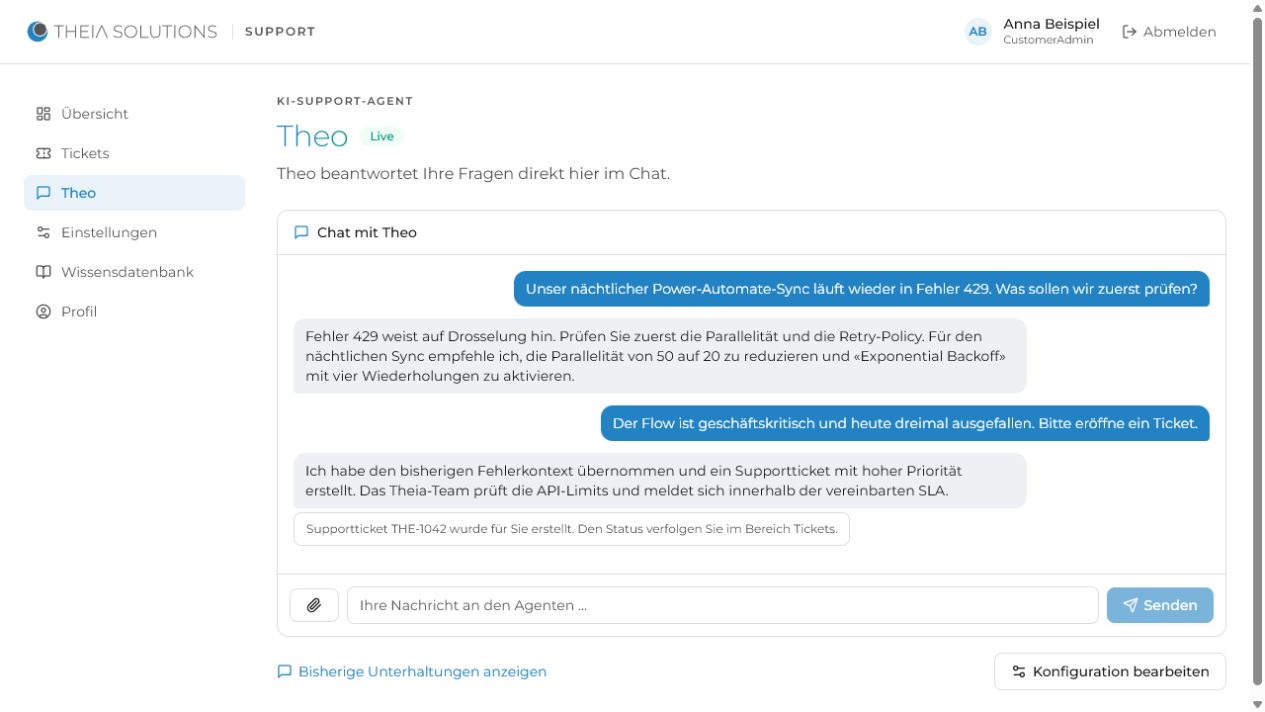
We connect approved content, define response rules and test answers with your team before launch.
We configure sign-in and permissions to match your use case and connected data sources.
We agree the limits and hand over unresolved requests with their context. Operations and ongoing review are available.
Your team can maintain instructions and knowledge sources in Copilot Studio. These views from Microsoft Learn show the product interface.
An agent's instructions, model selection and knowledge sources — source: Microsoft Learn documentation
Getting started: describe the agent, have it built, refine — source: Microsoft Learn documentation

We clarify the use case, data and feasibility. You then receive a written fixed-price quote with Microsoft licences listed separately.
We connect your content, build the agent and test answers and handovers together with your team.

The agent goes live in Teams, on your website or in your CRM. We train your team and can continue to run and improve it.
Typically 2–4 weeks from kickoff to production, depending on data sources, integrations and approvals. We agree the scope and schedule before implementation.
Bring one recurring task to a free, no-obligation 30-minute call. We clarify the data, feasibility and your next step.
Book an intro callLET'S LOOK AT YOUR PROCESS
We discuss your starting point and the next useful step. 30 minutes, free and without obligation.

Milan Pincar
Managing Partner