Skip to content
    FOR MICROSOFT 365 AND SHAREPOINT ONLINE

    Theia Prozessportal: BPMN 2.0 process portal, right inside SharePoint Online.

    The process portal runs as an app in your SharePoint Online. You model flows in the browser, approve changes in two stages and keep evidence for ISO 9001 and ISO 14001 audits. The user interface is in German.

    Book an intro call
    THE STARTING POINT

    Processes in one place, changes with evidence.

    Questions that come up day to day and in audits

    • Which version of a flow is valid?
    • Who reviewed the change, and who approved it?
    • What changed compared to the last version?
    • Which role does which step, with which documents?

    Answers in the process portal

    • The process map shows every process with its valid version.
    • Every change runs as a request through review and approval. The history records every decision with person and time.
    • The comparison shows what is new, what changes and what is removed.
    • The step table shows the role, contributors, documents and applications for each step.
    FEATURES

    What the process portal does.

    Everyone reads, key users model, quality management approves. The screenshots show the German user interface with the fictitious sample data of “Musterwerke AG”. Click an image to enlarge it.

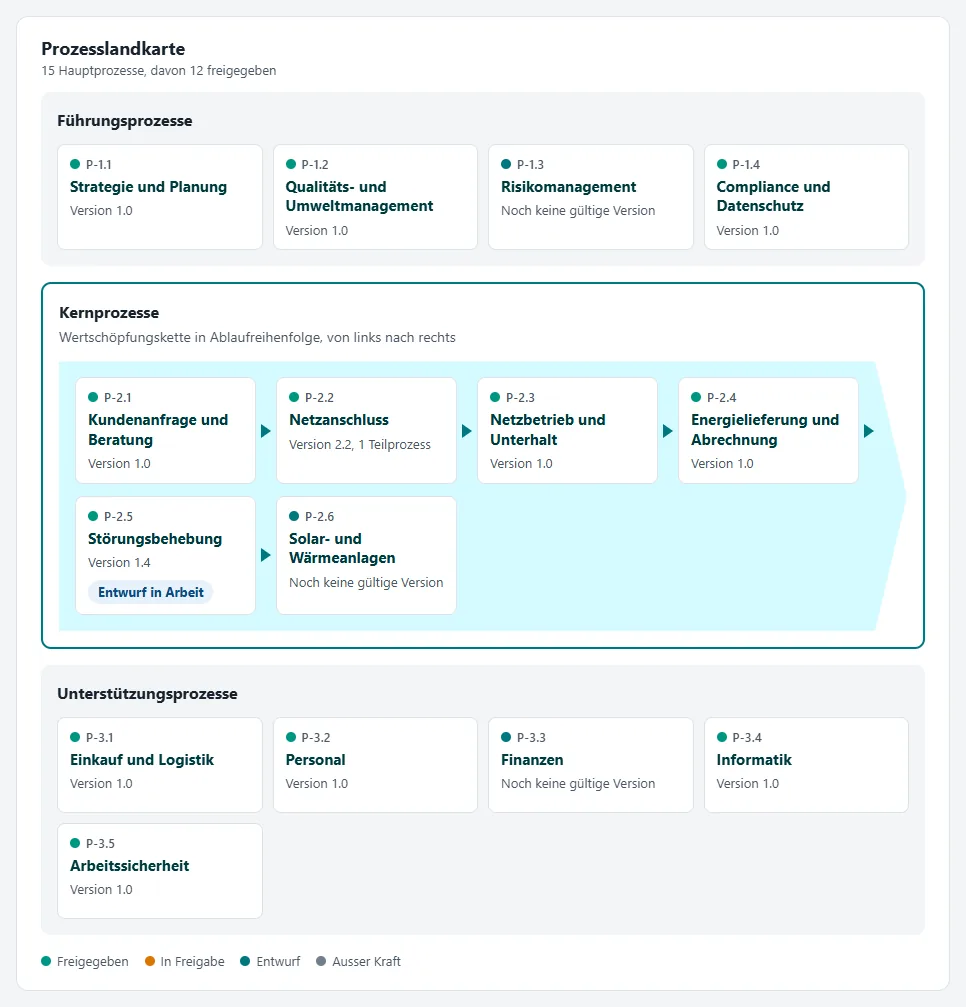
    Process map and search

    Management, core and support processes at a glance, with the core processes shown as a value chain.

    As you type, the search shows processes, steps, documents, roles, applications and KPIs. From three characters on, it adds hits from the content of documents, using SharePoint search.

    Hits by type and from the content of documents.

    BPMN 2.0 flows, steps with everything they need

    The step table is derived directly from the model. Clicking a step shows its role, contributors, input and output, documents, applications, KPIs with traffic lights and the related standard clause.

    Comments are attached to steps. The process owner or quality management can turn them into a change request. Every model can be downloaded as a BPMN file.

    Flow and step table on the process page.

    Modelling in the browser

    A BPMN editor with palette and properties, no Visio licence needed. You enter name, role, contributing roles, documents, applications and KPIs next to the diagram, also by keyboard.

    A rule check without AI flags gaps as you work, for example missing start or end events, unreachable steps, unlabelled gateways or steps without a role.

    Editor with palette, properties and rule check. The “KI-Entwurf” (AI draft) button appears with the AI module.

    Two-stage approval with comparison

    A change starts as a request with a draft. The process owner reviews it, quality management approves it. The four-eyes principle works as a warning or as a block.

    “What changes” lists new, changed and removed steps and highlights them in the diagram. A minor change raises the version by 0.1, a major change creates a new major version.

    Change request in review: stages, highlighted change and decision.

    “What changes” as a list and in the diagram.

    Documents with approval

    New Word document, blank or from a template, file upload or link. Approval runs in the same two stages as for processes, using SharePoint content approval. Readers only see approved versions.

    Documents with type, processes, version and status.

    Cockpit for quality management and leadership

    Who is responsible for what in which process: per role and as a matrix across the core processes (letters from the German interface: V process owner, D execution, M contribution, F approval).

    Responsibilities per role.

    Matrix of roles and core processes.

    KPIs, actions and reviews

    The cockpit shows KPIs with target, traffic light and trend, actions with standard clause, due date and status, and reviews that are due.

    Responsibilities, KPIs, measurements and actions can be exported as CSV.

    KPIs with traffic light, target and trend.

    Configuration without code

    Columns that your admins add in SharePoint to the lists of processes, documents, roles and applications appear in the app. Admins and quality management maintain catalogues of roles, applications, KPIs and measurements directly in the portal.

    Catalogues maintained in the portal, here the roles.

    AI module (optional)

    AI draft of a flow from keywords, AI pre-check of a change request and an AI assistant that answers questions with sources. All AI results are suggestions; people make the decision.

    The AI pre-check does not replace the review: it points out possible gaps, but it can miss things or flag them wrongly. The module is off by default and needs Power Automate Premium, an environment with Dataverse and credits.

    AI assistant: answer with sources.

    From the large monitor to the phone

    Process map, process page and cockpit use the full width of large screens and also work on a phone.

    Accessibility

    Navigation, forms and the properties in the editor can be operated by keyboard. Diagrams are drawn with the mouse.

    TECHNOLOGY

    How it runs in your Microsoft 365.

    Your Microsoft 365 tenant

    SharePoint site of the portal

    Page with the “Prozessportal” web part (SharePoint Framework), running as a full-page app
    14 lists and libraries: processes, versions, models, documents, requests, history, KPIs, actions and more

    Optional

    Power Automate: notifications via Teams and mail, daily reminder of reviews that are due
    Power Automate with AI Builder: AI module (premium)

    The core: no Theia server, no external services, no API permissions. The optional flows run in your Power Automate environment; the AI module uses Microsoft AI Builder.

    Installation in three steps

    1. Your SharePoint admin creates the site collection app catalogue of the portal site once.
    2. Upload the package, install the app and create a page with the web part, in the browser or by script. The script needs its own app registration for PnP PowerShell in your tenant; the browser route does not.
    3. On first start, “Portal einrichten” (set up portal) creates the lists and libraries. Then enter settings and roles.
    • Code and images come from the package in the app catalogue, not from a CDN.
    • The web part needs no custom script on the site.
    • The core needs no premium licence.
    • Optionally, “Berechtigungen einrichten” (set up permissions) creates its own permission levels, two groups and permissions per list, and writes a report as evidence.
    AUDIT

    Support for ISO 9001 and ISO 14001 audits.

    • Standard clause per process and per step.
    • Every version is kept as a separate snapshot, with BPMN file and step table. Any two versions can be compared.
    • The history records submission, review, approval, rejection and notifications with person and time.
    • With “Berechtigungen einrichten”, SharePoint enforces the rules: the history can only be appended to, approved states are read-only, and readers only see approved documents. Quality management can unlock locked states; every change stays in the version history.
    • Review interval per process. The cockpit shows reviews that are due; an optional daily flow reminds the process owner.
    • Actions from audits with finding, standard clause, owner, due date and status; overdue actions are marked.
    • KPIs with target, measurements and traffic light.
    • CSV export of steps, responsibilities, KPIs, measurements and actions.

    The portal supports your evidence. Certification itself remains a matter for your management system and your certification body.

    History of a change request: the evidence in an audit.

    Report of “Berechtigungen einrichten” (set up permissions): levels, groups and QM group check.

    REQUIREMENTS

    What you need, and what to know.

    Requirements

    • SharePoint Online in Microsoft 365 Business Standard or Premium, E3 or E5.
    • A dedicated site for the portal, ideally a communication site.
    • Once: a person with the SharePoint admin role and an owner of the site.
    • No additional licences for readers.
    • Notifications (optional): Power Automate flows with a service account.
    • AI module (optional): Power Automate Premium for the account that runs the flow, a Power Platform environment with Dataverse, and credits.

    Good to know

    • The user interface is in German.
    • One portal per site.
    • For lists with more than a few hundred entries, we look at the data volume in the intro call.
    • Notifications arrive a few minutes after the decision.
    • New documents appear in the content search once SharePoint has indexed them.
    • A Teams app needs the tenant app catalogue; otherwise the portal page can be added to Teams as a “Website” tab.
    • Without “Berechtigungen einrichten”, the rules apply in the app only. Even with the permission model, members can change processes, requests and comments directly in the lists; the SharePoint version history shows this.
    • The permission model works on the root site of a site collection only, not on subsites.
    • Quality management approves documents once “Berechtigungen einrichten” has run; otherwise only site owners can.
    • Your own backup of the portal data (by script) is a copy for reference; there is no automatic restore. The SharePoint recycle bin and version history work as usual.

    We clarify questions about your environment in the intro call. Book an intro call

    FAQ

    Frequently asked questions

    Theia Prozessportal is a process portal app for SharePoint Online in Microsoft 365. It brings the process map, BPMN 2.0 flows, roles, documents, KPIs and actions together in one place. Changes go through review and approval in two stages, and the history records every decision with person and time. Technically, it is a SharePoint Framework web part that runs as a full-page app. The user interface is in German.

    SharePoint Online in Microsoft 365 Business Standard or Premium, E3 or E5. The core of the portal needs no premium licence, and readers need no additional licence. The optional notification flows use standard Power Automate connectors and a service account. Only the AI module needs Power Automate Premium for the account that runs its flow, a Power Platform environment with Dataverse, and credits (AI Builder or Copilot credits). We discuss the terms for the process portal itself in the intro call.

    In lists and libraries of the portal site in your Microsoft 365 tenant. The app loads its code from the package in your site's app catalogue. There is no Theia server, no external service and no API permission. The optional flows run in your Power Automate environment. Only if you switch on the AI module does a flow in your environment send the required content to a prompt in AI Builder, a Microsoft service. Questions and answers in the AI assistant are visible to everyone with access to the portal.

    No. The AI module is off by default, and the portal works fully without it. The rule check in the editor needs no AI either. The AI module adds an AI draft of a flow from keywords, an AI pre-check of change requests and an AI assistant that answers questions with sources. All AI results are suggestions: people review them and decide. Every AI request uses credits; the app shows the requests of the last 30 days with estimated credits.

    No. Flows are modelled in BPMN 2.0 directly in the browser, without a Visio licence. Every model can be downloaded as a BPMN file.

    The user interface of the process portal is in German. This page describes it in English.

    The portal page can be added to Teams as a "Website" tab. A dedicated Teams app requires installation through the tenant app catalogue.

    A dedicated SharePoint site for the portal, ideally a communication site. Your SharePoint admin creates the site collection app catalogue for this site once. Then the package is uploaded, the app installed and a page with the web part created, in the browser or by script (the script needs its own app registration for PnP PowerShell; the browser route does not). On first start, "Portal einrichten" (set up portal) creates the lists and libraries. After that, you enter settings, roles and your processes. No custom script is needed on the site.

    Yes. On a separate trial site, "Beispieldaten laden" (load sample data) loads the fictitious Musterwerke AG with 15 processes, four modelled flows, one open change request, KPIs and actions. One person can play through every step with it. You do not load sample data for live use.

    Would you like to see the process portal?

    In the intro call we look at how you document processes today, what your audits require and how the portal fits into your Microsoft 365. 30 minutes, no obligation.

    Theia Prozessportal is a product of Theia Solutions AG. The screenshots show the German user interface with the fictitious sample data of “Musterwerke AG”. Diagrams with bpmn-js (bpmn.io). Microsoft 365, SharePoint, Microsoft Teams, Power Automate, AI Builder, Dataverse and Visio are trademarks of the Microsoft group of companies.

    Cookie Settings

    Optional cookies and external services need your consent. Privacy Policy.