Skip to content
    FOR MICROSOFT 365 AND SHAREPOINT

    Theia On- und Offboarding: joiners and leavers as cases, with due dates and evidence.

    For every joiner, leaver and internal move, you see who does what by when, right in your SharePoint Online. Statutory duties on joining, leaving and internal moves (including CO, ArG, UVG, KVG, BVG, withholding tax, AIG, AVIG, FADP) appear in the case as tasks with legal basis, due date and evidence. Built for employers in Switzerland. The user interface is in German.

    Book an intro call
    THE STARTING POINT

    Joiners and leavers in one place, tasks with evidence.

    Questions from day-to-day HR

    • Who blocks the account on the last day?
    • Has the laptop come back?
    • Was the information under Art. 330b CO provided in time?
    • When does the data have to go?

    Answers in Theia On- und Offboarding

    • IT, with the task "Zugänge sperren" (block access): due on the day you set in the case; if none is set, on the day the case is entered after a summary dismissal or on the fast track "sofort" (immediately), otherwise on the last working day. From that date, a report shows where it is still open.
    • The inventory shows what each person has been issued and what has come back. From seven days before the last working day, a report lists what a leaver still has.
    • If the contract lacks these details, the case gets a task for them, due one month after the start date. The app fills in the letter from the case; you add the salary by hand.
    • After the deletion period (by default 12 months after closing), the app lists the case under due deletions, but a closed joiner or internal-move case only once the person's leaver case is closed too. HR deletes it in the app.
    FEATURES

    What Theia On- und Offboarding does.

    HR runs the case; IT, payroll and line managers complete their tasks. The screenshots show the German user interface. Click an image to enlarge it.

    One case per joiner, leaver and internal move

    Every case has a case owner and key dates such as start date, last working day or end of contract; you can cancel a joiner case, for example if the person does not start the job.

    A case only closes once no statutory task is still open. For a new leaver case or internal move, the app carries over the details from the person's previous case for you to check.

    Internal move with "Wirksam ab" (effective from) and its tasks.

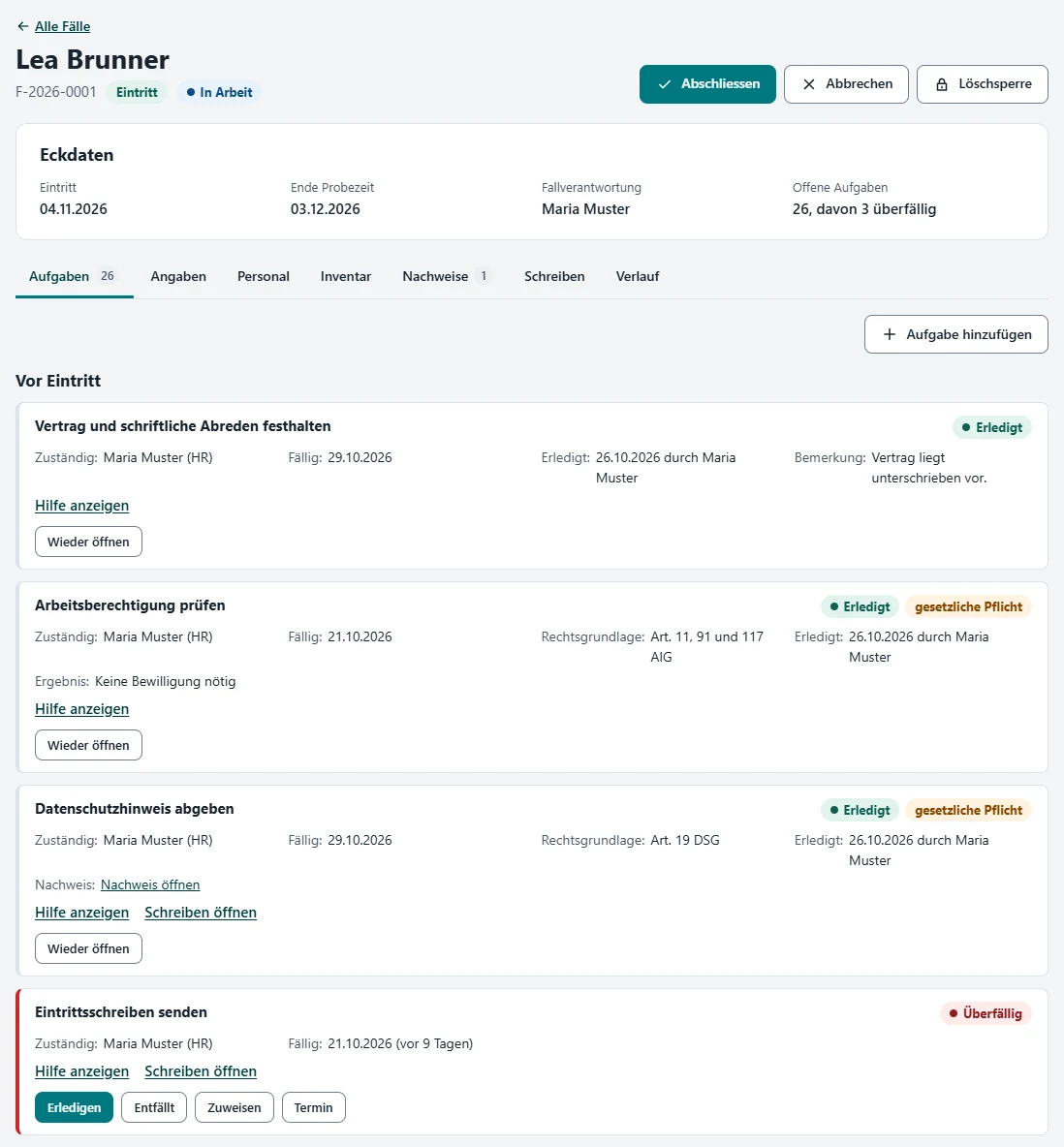
    Tasks with legal basis, due date and evidence

    The Theia standard comes with more than 90 task templates; which ones a case gets depends on, among other things, contract type, type of exit, the person's details and your company's settings. Statutory tasks state their legal basis and can only be skipped with a reason.

    Predecessors must be completed or skipped first, and where evidence is required, the task can only be completed with it.

    Statutory tasks with their legal basis, with the help expanded.

    IT steps in the right order

    For leavers: block access and sign the person out of all sessions; then remove email apps, MFA methods and admin roles, clean up devices and carry out the mailbox decision; remove the licence only once the line manager has taken over the files from the OneDrive.

    For joiners, account, licence and MFA are tasks in the case. Your IT carries out the steps in Microsoft 365 and confirms them in the app. There is no field for passwords.

    Templates for the leaving date with role, due date and conditions.

    Four calculators for HR

    End of probation; end of employment after notice, with the notice period by year of service or a contractual one; an aid for checking the protection period during incapacity due to illness or accident when the employer gives notice after probation; continued pay after death. The calculators store nothing.

    Notice calculator with result and calculation steps.

    Letters and evidence

    Seven templates in German, including the privacy notice for employees, the information on the employment relationship (Art. 330b CO), the return receipt and the welcome email before the first working day.

    The app fills them in from the case; you copy the text, download it as a text file or print it, and the app sends nothing. Evidence is kept in a library of its own that only HR and the app admins can see.

    Information on the employment relationship (Art. 330b CO), filled in from the case.

    Inventory and system catalogue

    Items issued per person, from laptop to credit card, with status until return and a return receipt. For devices you record the action, such as retire or wipe, which your IT carries out in Intune, outside the app. HR, IT and the app admins see the inventory.

    In the system catalogue you list your systems with the person responsible; for active systems, that person gets a task when someone joins or leaves, depending on the settings.

    Issued items with their status until return.

    Overview and reports

    Under "Meine Aufgaben" (my tasks) everyone sees their open tasks and those of their group; the overview shows the most urgent of them, the number of overdue ones and the joiners and leavers of the next 30 days.

    Seven reports, for example on fixed-term contracts, work permits or leavers without access removal, can be exported as CSV; none of them rates the staff who handle the tasks. If you want email reminders, you set them up with a flow template for Power Automate.

    Report "Offene Instruktionen" (open safety instructions) with case, unit and due date.

    DATA PROTECTION

    Data on your site, access enforced by SharePoint.

    The app works with lists and a library on your own SharePoint site, which it creates itself during setup. Who sees what is enforced by SharePoint, not by the user interface.

    • Personnel details and evidence are visible only to HR and the app admins. Leaver cases and confidential cases are visible only to HR, IT, payroll and the people involved in the case, plus the app admins.
    • App admins are the site owners and everyone allowed to manage permissions on the site; technically, they see all data. Ideally this is the HR lead, plus at most one trusted IT person.
    • No fields for salary, AHV number, bank details, home address, health data or date of birth.
    • The app excludes cases, personnel details, tasks, inventory, evidence and the log from SharePoint search.
    • You set the deletion period: by default 12 months after closing, 3 months for cancelled joiner cases. After that, the case appears under due deletions, and HR deletes it under "Datenschutz" (data protection); a closed joiner or internal-move case only appears there once the person's leaver case is closed too. If an objection to the notice is raised (Art. 336b CO), you set a deletion hold until 180 days after the end of employment.
    • Access requests: all cases of a person as a file (JSON) and as a print view.
    • A log records status changes of cases, permissions, access requests, deletions, changed settings and loading the Theia standard, with case number, who and when, without details about the person concerned.
    • Theia sets up the app with you, with time-limited access and a data processing agreement.

    Data location: where Microsoft stores the data depends on your tenant's data location (default geography and the in-country storage setting), and for the optional flow also on the region of your Power Platform environment. These points are on the app's checklist. Theia checks them with you during setup; we advise on technology, not on law.

    Log with case number, who and when.

    TECHNOLOGY

    How it runs in your Microsoft 365.

    Your Microsoft 365 tenant

    SharePoint site of the app

    Page with the "Theia On- und Offboarding" web part (SharePoint Framework), running as a full-page app
    11 lists and the "Nachweise" (evidence) library: cases, personnel details, tasks, inventory, log and more
    4 groups and 3 permission levels of its own, from "Berechtigungen einrichten" (set up permissions)

    Optional

    Power Automate: flow template for email reminders, with a service account, not part of the package

    The core: no Theia server, no external services, no API permissions. The app works with the permissions of the signed-in person; your IT carries out the IT steps itself in Microsoft 365.

    Setup in four steps

    1. Your SharePoint admin creates the site collection app catalogue for the site once.
    2. Upload the package, install the app and create a page with the web part, in the browser or by script. The script needs its own app registration in your tenant; the browser route does not.
    3. On first start, "App einrichten" (set up app) creates the lists and "Berechtigungen einrichten" (set up permissions) the groups and permissions. Then you add the members of the groups.
    4. You load the Theia standard with parameters, task templates and letters and adapt it to your company. The app's checklist takes you through 19 points, from data location to removing Theia's access.
    • Code and images come from the package in the app catalogue, not from a CDN; no external scripts or fonts.
    • The app itself does not change tenant-wide settings or the site's sharing settings.
    REQUIREMENTS

    What you need, and what to know.

    Requirements

    • SharePoint Online in your Microsoft 365.
    • A dedicated communication site without a Microsoft 365 group, as the root site of a site collection with an owners group.
    • Once: a person with the SharePoint admin role for the site collection app catalogue.
    • As app admin, normally the HR lead, plus at most one trusted IT person; they are the site owners.
    • Email reminders (optional): a service account with an Exchange Online mailbox and Power Automate for Microsoft 365.

    Good to know

    • The user interface is in German, as are the seven letters; HR can add translations into other languages.
    • Add only individual people to the app's groups: security or Microsoft 365 groups do get permissions in SharePoint, but the app does not recognise their members.
    • Until "Berechtigungen einrichten" (set up permissions) has run, new cases, personnel details and evidence stay locked. The run removes all other assignments from the app's lists, including those of the site's Members and Visitors groups.
    • Only the optional flow sends emails, and only to an individual assignee: tasks without one, such as those of the IT and payroll groups, trigger no email, and the case owner gets none when a task is overdue.
    • IT, payroll and contributors such as line managers can technically change any task they can see; the app only offers them their own tasks and those of their group. In cases with restricted access, such as leaver cases, IT, payroll and the people involved also see the HR tasks with help text and legal basis.
    • The notice and protection-period calculators work out the end of the contract, not the last working day; HR enters that by hand. The protection-period check only covers incapacity due to illness or accident.
    • Deleting a case in the app does not cover backups, earlier exports or the flow's emails; items still issued stay in the inventory. Retention policies in your Microsoft 365 can keep deleted content.

    We clarify questions about your environment in the intro call. Book an intro call

    FAQ

    Frequently asked questions

    An app for onboarding and offboarding in SharePoint Online: it runs every joiner, leaver and internal move as a case. Statutory duties on joining, leaving and internal moves (including CO, ArG, UVG, KVG, BVG, withholding tax, AIG, AVIG, FADP) appear in the case as tasks with legal basis, due date and evidence. It also covers the IT steps for Microsoft 365 as tasks in the right order, four calculators, letters, an inventory, reports, and deletion and access requests. Built for employers in Switzerland.

    SharePoint Online in your Microsoft 365. The app needs no API permissions. For the optional email reminders you also need a service account with an Exchange Online mailbox and Power Automate for Microsoft 365; both are included, for example, in Microsoft 365 Business Basic or Standard. The flow uses standard connectors only, so no premium licence is needed. The app itself is priced at a flat fee (see "What does it cost?").

    In lists and a library on a dedicated SharePoint site in your Microsoft 365 tenant; the app creates them itself during setup. There is no Theia server and no external service. Where Microsoft stores the data depends on your tenant's data location, and for the optional flow also on the region of your Power Platform environment. Theia checks this with you during setup; we advise on technology, not on law.

    No. Theia On- und Offboarding complements your payroll software and your HR system; it does not replace them. The person gives master data such as their AHV number or bank details directly to the payroll team; the app has no fields for them. Payroll processing, the personnel file, recruiting, time recording itself and a portal before the first working day are deliberately not part of it.

    No. The app has no rights in Entra ID, Exchange Online, Intune or Teams. It lists the IT steps as tasks with due dates, in the right order; your IT carries them out in the Microsoft 365 admin centers and confirms them in the app. After a summary dismissal or on the fast track "sofort" (immediately), blocking access is due on the day the case is entered, unless the case sets another date.

    The case holds, among other things, name, business email, role, organisational unit, location, line manager, key dates, contract type and workload. Confidential details such as work permit, withholding tax liability or type of exit are kept in the personnel details, which only HR and the app admins can see. There are no fields for salary, AHV number, bank details, home address, health data or date of birth. Remark fields carry the note "auskunftspflichtig, keine Gesundheitsangaben" (subject to access requests, no health information).

    No. The calculators and templates are aids and do not replace legal advice; the app also says so on the calculators. Deadlines and thresholds are parameters with "gültig ab" (valid from). Different rules from a collective or standard employment contract (GAV, NAV) are entered for the company as a parameter of its own, and for a single case as a deviation with a reason.

    The user interface is in German, and the seven letters come in German. HR can add translations into other languages where needed; the app then uses the case's correspondence language, otherwise the German text. This page describes the app in English.

    Theia sets up the app with you, with time-limited access and a data processing agreement; on your side, the HR lead is normally the app admin. You need a dedicated communication site without a Microsoft 365 group; your SharePoint admin creates its site collection app catalogue once. After installation, the app's checklist takes you through 19 points, from data location to removing Theia's access.

    Theia On- und Offboarding is priced at a flat fee by company size (up to 50 or up to 250 employees), not per user. We discuss the terms in the intro call.

    Would you like to see Theia On- und Offboarding?

    In the intro call we look at how you handle joiners and leavers today, who is involved and how the app fits into your Microsoft 365. 30 minutes, no obligation.

    Theia On- und Offboarding is a product of Theia Solutions AG. The screenshots show the German user interface with sample data of "Muster AG". Microsoft 365, SharePoint, Microsoft Entra ID, Exchange Online, Microsoft Intune, Microsoft Teams, OneDrive, Power Automate and Power Platform are trademarks of the Microsoft group of companies.

    Cookie Settings

    Optional cookies and external services need your consent. Privacy Policy.