Dynamics 365 Telephony with Teams
06. February 2026
Since I am currently calling many potential customers to generate new business, I naturally use the exact software we also sell to our clients. In this case, it's Dynamics 365 Sales with the integrated Microsoft Teams Dialer. And as is often the case with real-world use, you encounter a few challenges that you wouldn't necessarily come across in a demo environment. I'd like to share two of these challenges with you today.
Challenge 1: One call, ringing everywhere
When you make a call through the Teams Dialer in Dynamics 365, you quickly notice that the call doesn't just ring in the browser where you initiated it. It also rings simultaneously on the Teams Desktop Client, the Teams Mobile App, and potentially in every other browser tab where Teams is open. This can be quite irritating, especially when you're in a focused calling session and suddenly all your devices start ringing at once.
The solution is relatively straightforward: in the Teams settings, you can define which devices should ring for incoming calls. I recommend setting it so that only the browser session where you're actively working with Dynamics 365 handles the calls. This way, you avoid the "concert" of ringing devices and can work in a focused manner.
Challenge 2: The Dialer and Audio Settings
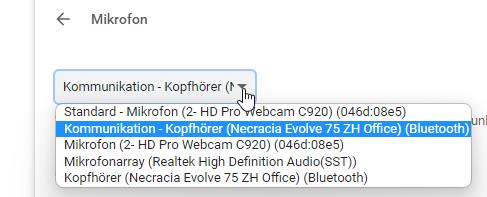
The second challenge relates to the audio settings in the browser versus the desktop client. When you use the Teams Dialer directly in the browser within Dynamics 365, you need to make sure that your browser has access to the correct audio devices. This is especially important if you use a headset – the browser needs to be configured to use the headset as both the input and output device.
A common pitfall: you've set everything up correctly in the Teams Desktop Client, but the browser uses completely different audio settings. The result? You can't hear anything, or worse – your conversation partner can't hear you. The fix is to check the audio settings directly in the browser's Teams session and adjust them accordingly.
Conclusion
Using the Teams Dialer within Dynamics 365 Sales is a powerful combination for efficient customer communication. However, as with any tool, it's worth taking the time to configure it properly. Once you've addressed these two common challenges – managing which devices ring and ensuring correct audio settings – you'll have a smooth and productive telephony experience directly within your CRM.
Do you have questions about setting up Dynamics 365 with Teams telephony? Feel free to reach out to us – we're happy to help!