Agent Builder vs. Copilot Studio: When the Simple Path Wins

Create an agent in Copilot Studio today and you land in the Microsoft Copilot harness, Microsoft's new foundation for agents. There, even building and testing consume Copilot Credits, with or without a Copilot licence. The classic Copilot Studio, the standard harness, is now tucked away under “Other ways to build”. The direction is clear: more power, more credits.
For most everyday agents, though, that is overkill. An agent that answers questions about your staff handbook, drafts proposals from a template or turns emails into a status update needs no development environment. And as long as everyone using it has a Copilot licence, it needs no credit budget either. Build it directly in Microsoft 365 Copilot, using Agent Builder. That is also where Microsoft suggests you start.
Key takeaways
- Simple internal agents belong in Agent Builder: a first version in minutes, current Copilot models and no extra cost for staff with a Copilot licence.
- Copilot Studio comes in when there is a specific reason, such as a customer channel or actions in other systems.
- The Microsoft Copilot harness should be treated like a project with a budget: building, testing and using agents there all consume Copilot Credits, even with a licence.
As of 7 November 2026. Microsoft is changing names, models and billing almost weekly, and Microsoft Ignite on 17–20 November 2026 may make some of these details out of date. Prices are Microsoft list prices, excluding VAT.
What Microsoft is changing
A harness is the layer between the AI model and the agent. It determines how the agent uses instructions, knowledge and tools, and in Copilot Studio also how usage is billed. Microsoft currently distinguishes four of them:
- Agent Builder in Microsoft 365 Copilot: its agents run on the Copilot Chat harness, directly inside Copilot. Not to be confused with the Microsoft Copilot harness in Copilot Studio.
- Standard harness in Copilot Studio: the classic Copilot Studio. Agents answer from knowledge sources and use tools; topics and the Power Fx formula language handle fixed flows. Still supported, but no longer the default.
- Microsoft Copilot harness in Copilot Studio: generally available since 3 August 2026. Until 28 October it was called the “GitHub Copilot harness”, the name most of the documentation and licensing guides still use, as does the interface in places. Despite the name, your data isn't sent to the GitHub Copilot service. Built for long, multi-step tasks and equipped with the newest models. Billed in Copilot Credits.
- Customer Conversation harness in Copilot Studio: in preview since 21 October 2026, for customer conversations in chat and on the phone.
Is Microsoft pushing everyone into the new harness?
When you create an agent, yes. You only reach the standard harness by a detour: via “Other ways to build” for each new agent or, for the current session only, via “Open classic experience”. There is no default setting for the whole organisation. New model generations and some new agentic capabilities are available only in the new harness.
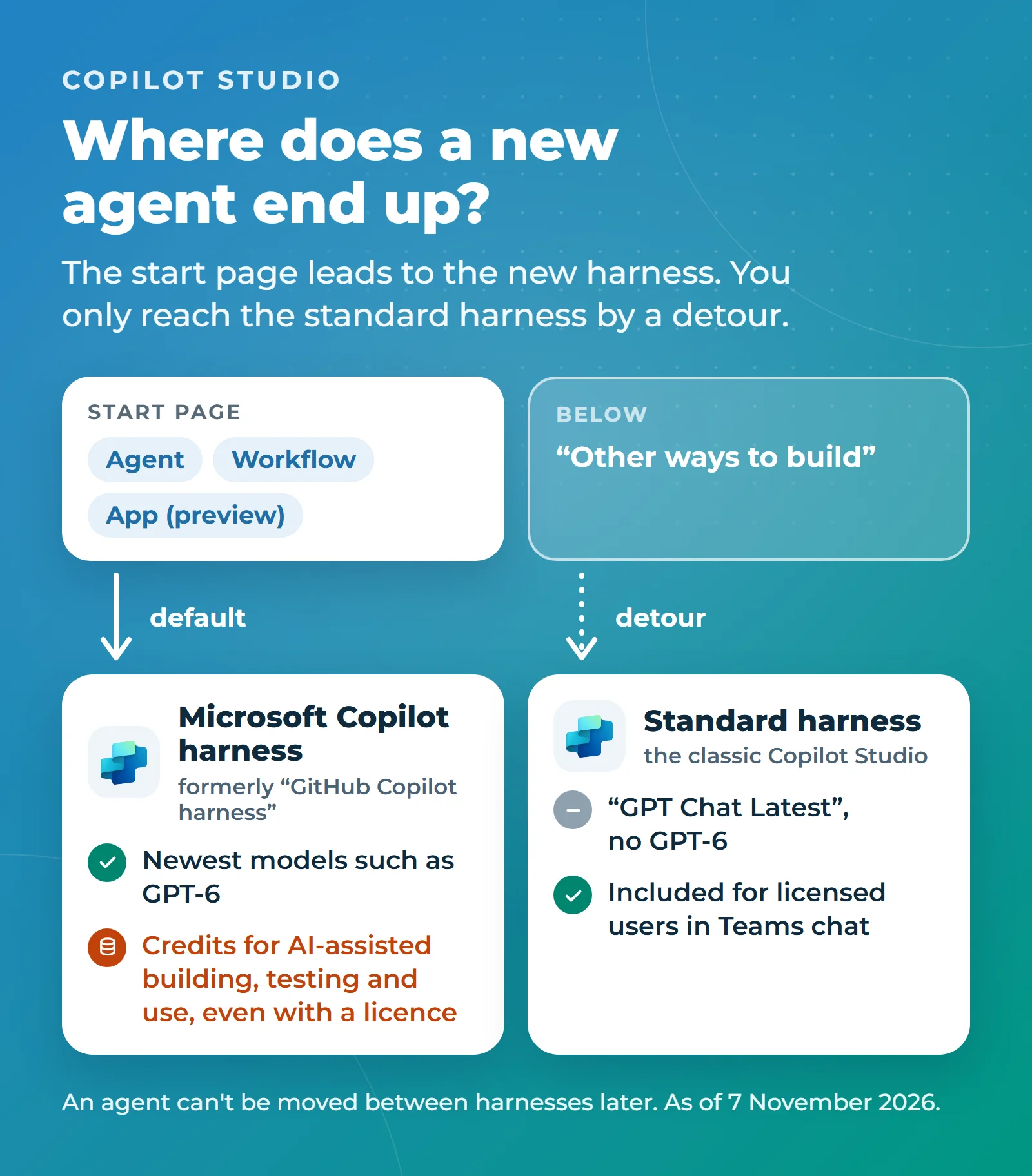
Officially, though, nobody is forced to switch: according to Microsoft's FAQ, the standard harness remains fully supported. Microsoft's own guidance on choosing a harness even warns that, without optimisation, a more capable harness can overwork a simple problem: more credits and more latency, without a better result.
On the other hand, Microsoft promises deeper reasoning and better answers in the new harness, especially over Microsoft 365 data. That pays off for matching invoices to purchase orders, but hardly for asking how much holiday you have left. One thing to know when creating an agent: it can't be moved between harnesses later.
Three reasons for Agent Builder
1. Built in minutes, no project needed
In Agent Builder, you describe in plain language what the agent should do, in German, French or Italian if you like. Copilot turns that into a name, a description and instructions, and suggests suitable knowledge sources. On the “Try it” tab, you can test it straight away with real questions. If you prefer to start from a template, there are more than 20, for example for policies, proposals or meetings.
You don't set up a Power Platform environment or publish to channels, and the subject-matter experts can build the agent themselves, right where they already work. Microsoft itself describes Agent Builder as an easy way to build agents for quick, straightforward projects.
2. Newer models arrive automatically
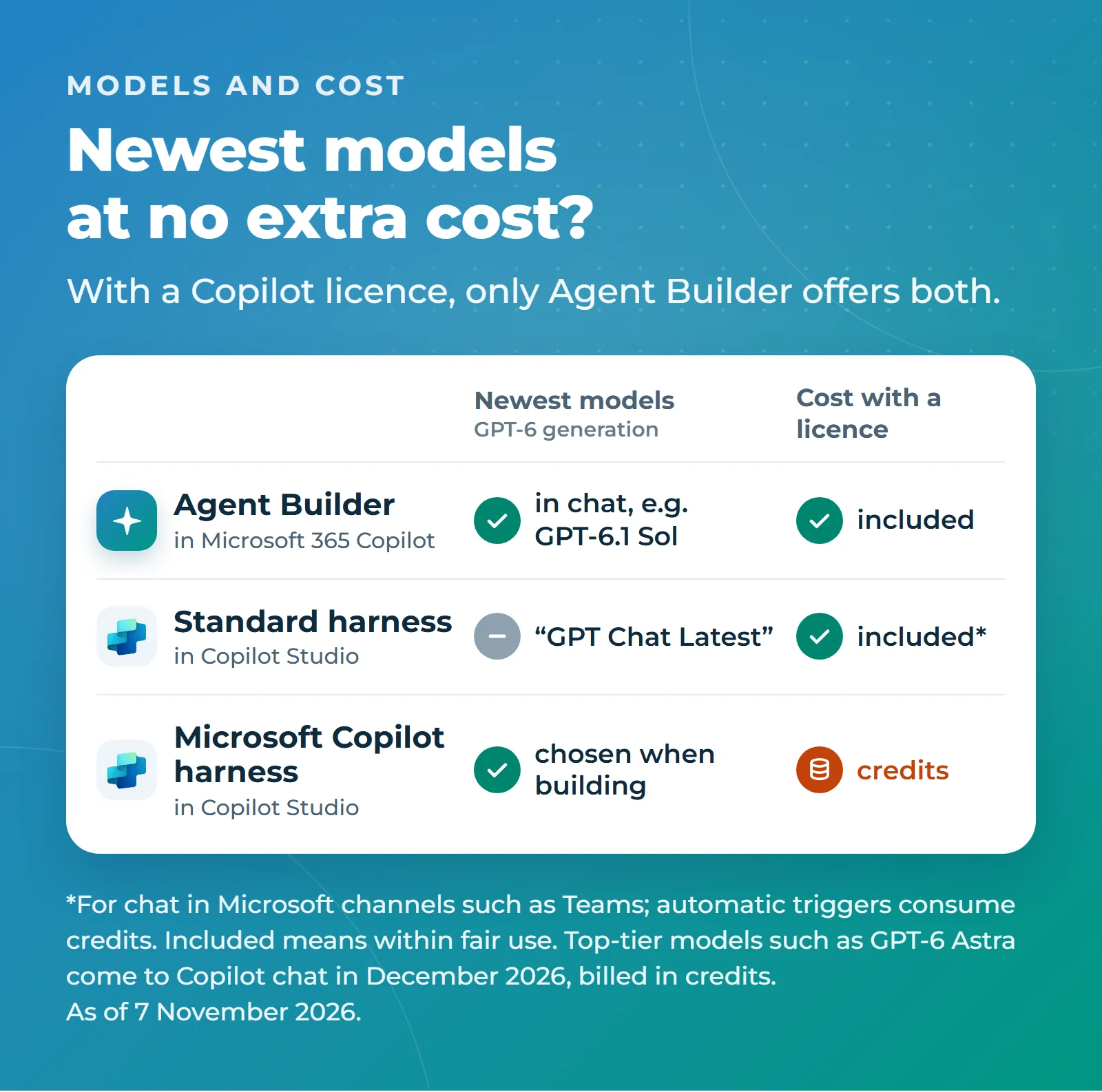
In the standard harness, Microsoft is standardising its GPT models on “GPT Chat Latest”, optimised for speed and low cost in everyday use. Most older GPT models retire by 12 November 2026; GPT-4.1 and GPT-5 remain, for now, only in environments that may not move data across regions. Claude 4.x is available there only with admin approval and processing outside the EU Data Boundary. Microsoft's current model list for the standard harness includes neither GPT-6 nor Claude 5: in Copilot Studio, those generations are available only in the Microsoft Copilot harness, billed in credits. Even there, Claude and most GPT-6 models need admin approval in Europe.
An agent built in Agent Builder, by contrast, runs on the models of Microsoft 365 Copilot. Microsoft has already moved these agents to newer models more than once in 2026, without anyone having to change anything. When building, you only set the default response mode: “Auto”, “Quick response” or “Think deeper”. In the chat with the agent, however, your staff can pick a specific model, such as GPT-6.1 Sol, which the standard harness doesn't offer. The exception is the newest top-tier models, such as GPT-6 Astra and Claude Fable 5.1: Microsoft only releases them in Copilot chat from early December 2026, billed in credits and only once your IT team has set up billing. Claude models also need to be enabled by your IT team (see the checklist). The flip side: you can't tie the agent itself to a specific model, and answers can change after a switch.
3. Already paid for with a licence
For staff with a Copilot licence, agents built in Agent Builder incur no additional cost, within Microsoft's fair-use rules. The same applies to standard-harness agents as long as they are used in chat in Microsoft channels such as Teams. Compared with the standard harness, Agent Builder therefore wins on speed and models, not on price. Microsoft has, however, announced usage limits within the licence; users who reach them continue in Auto mode or, if your IT team allows it, on credits.
If colleagues without a licence use the agent, answers based on instructions and public websites remain free. Microsoft bills answers from SharePoint or connectors in credits, provided your IT team has set up usage-based billing; without it, such agents only work in a limited way for these colleagues.
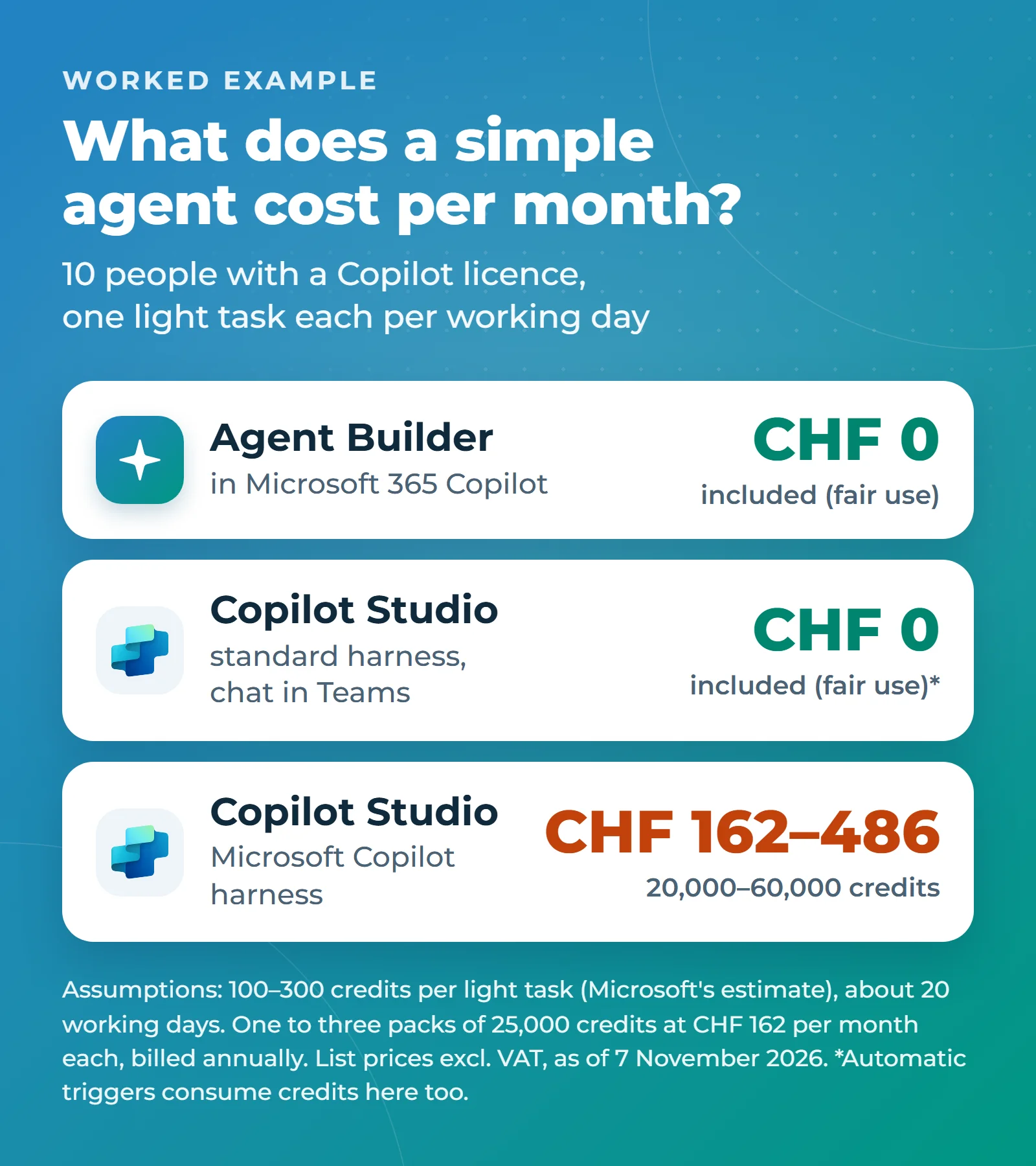
The new harness is different: AI-assisted building, testing and every use consume Copilot Credits there, regardless of licensing. Only manual configuration without AI is free. For a light task, such as a status update drawn from an email and an Excel spreadsheet, Microsoft estimates 100 to 300 credits. On pay-as-you-go at CHF 0.0083 per credit, that is roughly CHF 0.83 to 2.49. Per task. A pack of 25,000 credits costs CHF 162 a month, billed annually; unused credits expire at the end of each month. A worked example: ten people each have the agent handle one light task per working day. That is roughly 20,000 to 60,000 credits a month, or one to three packs costing CHF 162 to 486, on top of the licence.
Agent Builder vs. Copilot Studio at a glance
| Criterion | Agent Builder | Copilot Studio: standard harness | Copilot Studio: Microsoft Copilot harness |
|---|---|---|---|
| Where you build | In Microsoft 365 Copilot, on the web or in Teams | Copilot Studio | Copilot Studio |
| How you build | Describe it or pick a template, test immediately | Describe it, add knowledge and tools; topics and Power Fx for fixed flows | Describe it, skills, workflows |
| Models | Copilot's models, updated automatically; selectable in chat, e.g. GPT-6.1 Sol | “GPT Chat Latest”; Claude 4.x only with approval | Newest models such as GPT-6, chosen when building; in Europe, Claude (including Claude 5) and most GPT-6 models only with approval |
| Cost with a Copilot licence | Included (fair use) | Included for chat in Microsoft channels (fair use); automatic runs consume credits | Copilot Credits for AI-assisted building, testing and every use |
| Actions in other systems | No | Yes | Yes |
| Channels | Copilot (also inside Teams) and Office apps, not in Teams chats | Many, including website, SharePoint and custom apps | Copilot, Teams, website |
| Best for | Knowledge and assistant agents for a team | Fixed processes and customer channels | Long, complex tasks with a budget |
When you still need Copilot Studio
Microsoft's decision guide is clear: start with Agent Builder unless there is a specific reason for Copilot Studio. Typical reasons include:
- External users: your customers or partners need to use the agent, for example on your website.
- Actions in other systems: the agent needs to create a record, open a ticket or trigger an approval.
- Automatic start: the agent needs to start on its own, for example when a new email arrives. In Copilot Studio, such triggers consume credits, in the standard harness too and even with a licence.
- Fixed steps: a conversation must follow the same path every time, such as an HR notification with required fields and fixed routing.
- Run it like software: you want separate development, test and production environments, version rollback and a way to measure how well the agent answers.
- Tighter grounding in your sources: in Agent Builder, the model's general knowledge cannot be switched off; “Only use specified sources” merely prioritises your documents. The standard harness can block answers that aren't grounded in a source, though without a guarantee; the new harness has no such setting at all.
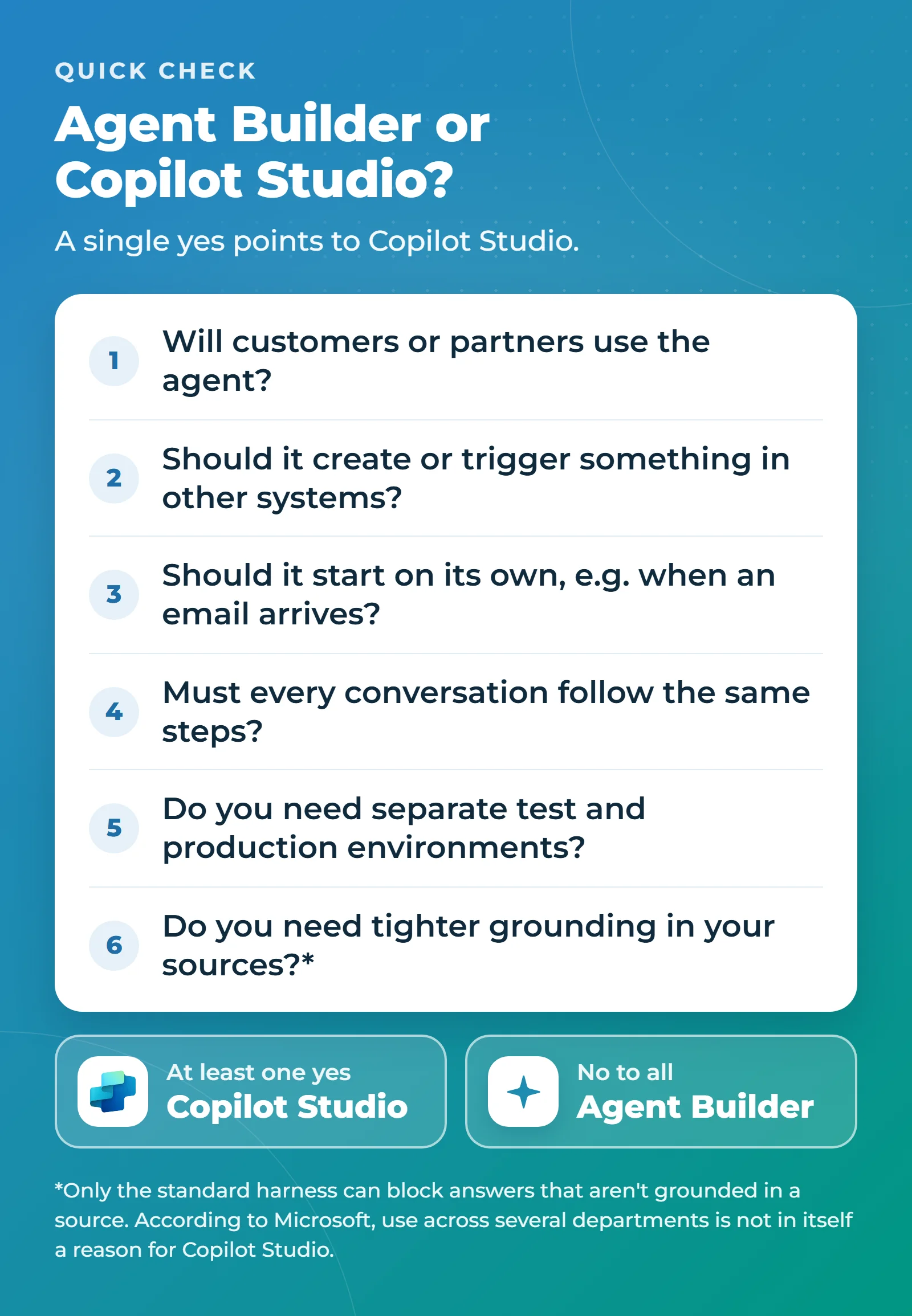
Incidentally, according to Microsoft, having users across several departments is not in itself a reason to use Copilot Studio. And moving up does not mean starting over: if an agent outgrows Agent Builder, you copy it to Copilot Studio. The name, description, instructions and knowledge from SharePoint and websites carry over; uploaded files, connectors and knowledge from email and Teams need to be set up again there. Check which harness the copy lands in: that decides whether credits apply.
Your first AI agent in five steps
- Create: in Microsoft 365 Copilot on the web or in Teams, select “New agent”.
- Describe: for example, “Answer questions about our staff handbook and always cite the section.” Or choose a template.
- Add knowledge: per agent, up to 100 SharePoint files, one SharePoint list, four web addresses and 20 uploaded files, in any combination. Tip: use only current, reviewed content.
- Test: on the “Try it” tab, ask ten real questions from your team and refine the instructions. Keep the questions and ask them again after major Copilot updates.
- Share: with individuals, groups or the whole organisation. The agent only appears in your organisation's catalogue once you submit it and your IT team approves it.
Uploaded files are available to everyone you share the agent with, so don't upload anything confidential. Three rules are enough to prevent agent sprawl: every agent has an owner and a deputy. Only reviewed agents are shared with the whole organisation. And SharePoint permissions are cleaned up before an agent touches them, because an agent shows each person everything they are allowed to see, including what they should never have had access to.
Checklist for your IT team
- Cap spending in two places: credits for Copilot Studio, including the new harness, are controlled in the Power Platform admin center: who may build agents, how many credits each environment gets and which limit applies per agent. The other credit-based Copilot services are governed by the spending policies in the Microsoft 365 admin center. There, “Auto-apply new services” is on by default, so newly supported paid services are added automatically. If you prefer, you can also cap the credits of individual Copilot Studio environments or agents there; such a policy then takes precedence over the Power Platform admin center.
- Copilot Business via a CSP partner: according to a Microsoft partner notice, usage-based billing is to be switched on by default for new purchases from the first quarter of 2027, for the whole organisation and with a default limit of 4,000 credits (about CHF 33) per person per month. Decide beforehand who may consume credits.
- Sharing with everyone: by default, anyone may share an agent with the whole organisation, without IT approval. If you don't want that, restrict it in the Microsoft 365 admin center.
- Claude stays largely off until you decide: as an EFTA state, Switzerland falls within Microsoft's EU Data Boundary. Claude models are therefore off by default in Copilot, agents and Copilot Studio; only Word, Excel and PowerPoint have a separate setting, which is on by default for tenants created after 25 March 2026. Check both. With Claude, data leaves the EU Data Boundary. That is a data protection decision, not a technical one.
- Existing agents: standard-harness agents are best left running; Microsoft recommends migrating only for a clear benefit. The upgrade tool, currently in preview, creates a copy in the new harness, consumes credits and carries over no knowledge sources, Power Fx or child agents.
Our recommendation
If you already pay for Copilot, have simple agents built in Agent Builder, ideally by the subject-matter experts themselves, using a common template for instructions and sources. Bring in Copilot Studio as soon as one of the reasons above applies, and the Microsoft Copilot harness only where the credit budget pays off.
A note from Milan: with a Copilot licence, Agent Builder is currently the best way to build simple agents. And most agents are simple.
Do you have ideas for agents and want to know where they belong? Bring two or three examples and we will work out together where each one fits. Afterwards you will know which agents your team can build itself and where Copilot Studio pays off. Book an intro call.
If you are just getting started with Copilot, you will find licence prices and our rollout package on our Microsoft 365 Copilot rollout page. Our overview of the Microsoft AI stack shows how Copilot, Copilot Studio and Microsoft Foundry fit together.
Microsoft, Copilot, Copilot Studio, Excel, GitHub, Microsoft 365, Microsoft Foundry, Outlook, Power Fx, Power Platform, PowerPoint, SharePoint, Teams and Word are trademarks of the Microsoft group of companies. Claude is a trademark of Anthropic, PBC. Other trademarks mentioned belong to their respective owners.